Basic Audit
Pull a full GBP profile audit without the spreadsheet
One click on Google Maps, Search, or Local Finder exports business details, Maps links, and external audit shortcuts into a clean dashboard report.
Tired of hunting Place IDs and review links by hand?
Agency onboarding often means copying NAP fields, Place ID, CID, categories, and a dozen Google URLs into a doc. Basic Audit captures the profile once and keeps every link ready to copy.
What you get
- Name, address, phone, website, hours, categories, services, and attributes
- Place ID, CID, Knowledge Graph ID, and verification signals
- 10 Google Maps link types (reviews, invite, posts, Q&A, same-address GMBs, and more)
- External Maps links (Apple, Bing, Waze, Facebook, Yelp)
- 17 external audit links (Ads transparency, Trends, PageSpeed, Schema, Ahrefs, Wayback, and more)
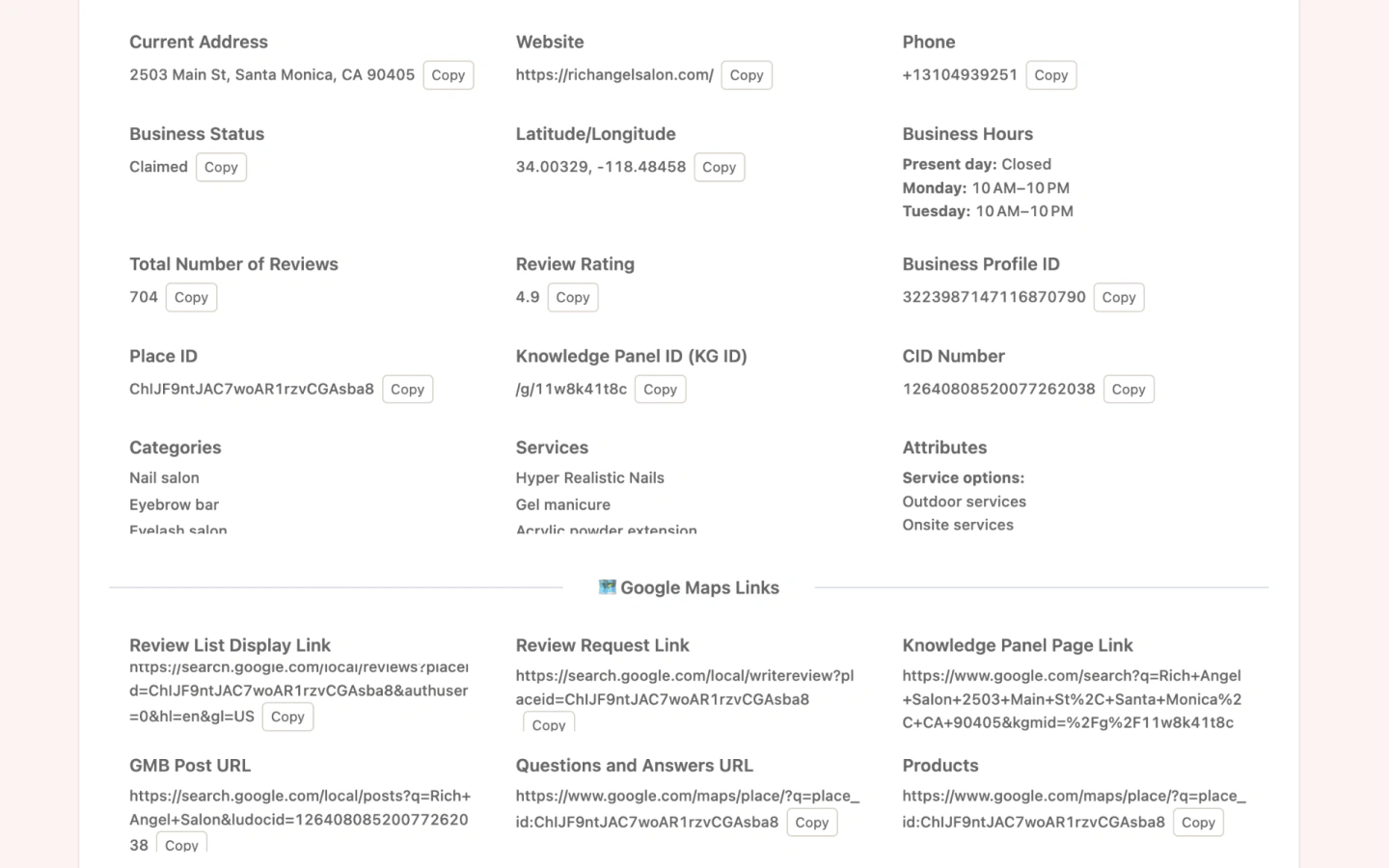
What the Basic Audit report includes
Profile fields
Core GBP details with one-click copy for client briefs and CRM notes.
Google Maps links
Review list, review request, Knowledge Panel, posts, Q&A, products, and same-address or same-domain GMB lookups.
External Maps
Jump to Apple Maps, Bing, Waze/HERE, Facebook Places, and Yelp search for the same business.
Marketing & site intelligence
Shortcuts to Google Ads transparency, Meta Ads Library, Trends by category, index checks, PageSpeed, Schema, BuiltWith, and more.
Report preview
Use cases
Client onboarding
Open the listing, run Basic Audit, and hand off a complete profile pack in minutes.
Proposal research
Collect Place ID, categories, and competitor Maps links before the sales call.
Monthly retainers
Re-run audits when NAP or hours change and keep a local report history in the extension.
How to run Basic Audit
Install GMB Audit Tool
Add the extension, then open Google Maps, Search, or Local Finder.
Find the business
Open a listing in results or on the place page. Audit buttons appear on the page.
Click Basic
Stay on the tab while the audit runs, then review the dashboard report.
Limits & Pro
- Free accounts can view 5 reports per day across all audit types.
- Pro unlocks unlimited report views.
- Basic Audit runs on the current Maps/Search/Local Finder listing—no separate spreadsheet upload.
Related GMB Audit features
Basic Audit FAQ
Does Basic Audit score the profile?
No. Basic Audit is an information and link pack: profile fields plus Maps and external tool links. Use Website Audit for pass/warn/fail checks.
Where do I find Place ID and CID?
They appear in the Basic Audit report when Google exposes them on the listing. You can copy them from the dashboard fields.
Do you call Ahrefs or PageSpeed for me?
No. Basic Audit builds deep links to those tools so you can open them yourself. Core audit data comes from the Google listing in your browser.
Run Basic Audit in your browser
Install GMB Audit Tool and audit Google Business Profiles on Maps, Search, and Local Finder—starting with Basic Audit.