Basic · Website · Review · Post · Local Scan
Audit GBP in your browser — no spreadsheets
GMB Audit Tool adds audit buttons on Google Maps, Search, and Local Finder. Export profiles, check website NAP consistency, analyze reviews and posts, and compare Local Pack competitors.
Built for local SEO agencies, freelancers, and marketers who need GBP reports without leaving Google.
Works on
Google Maps
Listings, place pages, and search results with injected audit buttons.
Google Search
Local Pack listings and Knowledge Panel–adjacent flows.
Local Finder
Compare packs and detail views where local results expand.
Audits run locally in your browser on pages you open. Free includes 5 report views per day.
Local GBP work is still too manual
If your team lives in Maps and spreadsheets, these frictions show up every week.
Manual NAP & Place ID copy-paste
Onboarding a client still means hunting Place ID, CID, review links, and hours across Maps tabs.
Competitor tabs everywhere
Understanding who ranks—and which categories they use—should not require twenty open listings.
Website vs GBP drift
Phone, hours, and city language on the site often disagree with Google. Finding every mismatch is slow.
Five audits. One Chrome extension.
GMB Audit Tool injects audit actions next to Google Business Profiles so you can export details, check the website, scrape reviews and posts, or scan local competitors—then open a dashboard report without leaving your workflow.
GBP audit features for local SEO
Each feature page explains checks, limits, and how to run the audit from Maps or Search.
Basic Audit
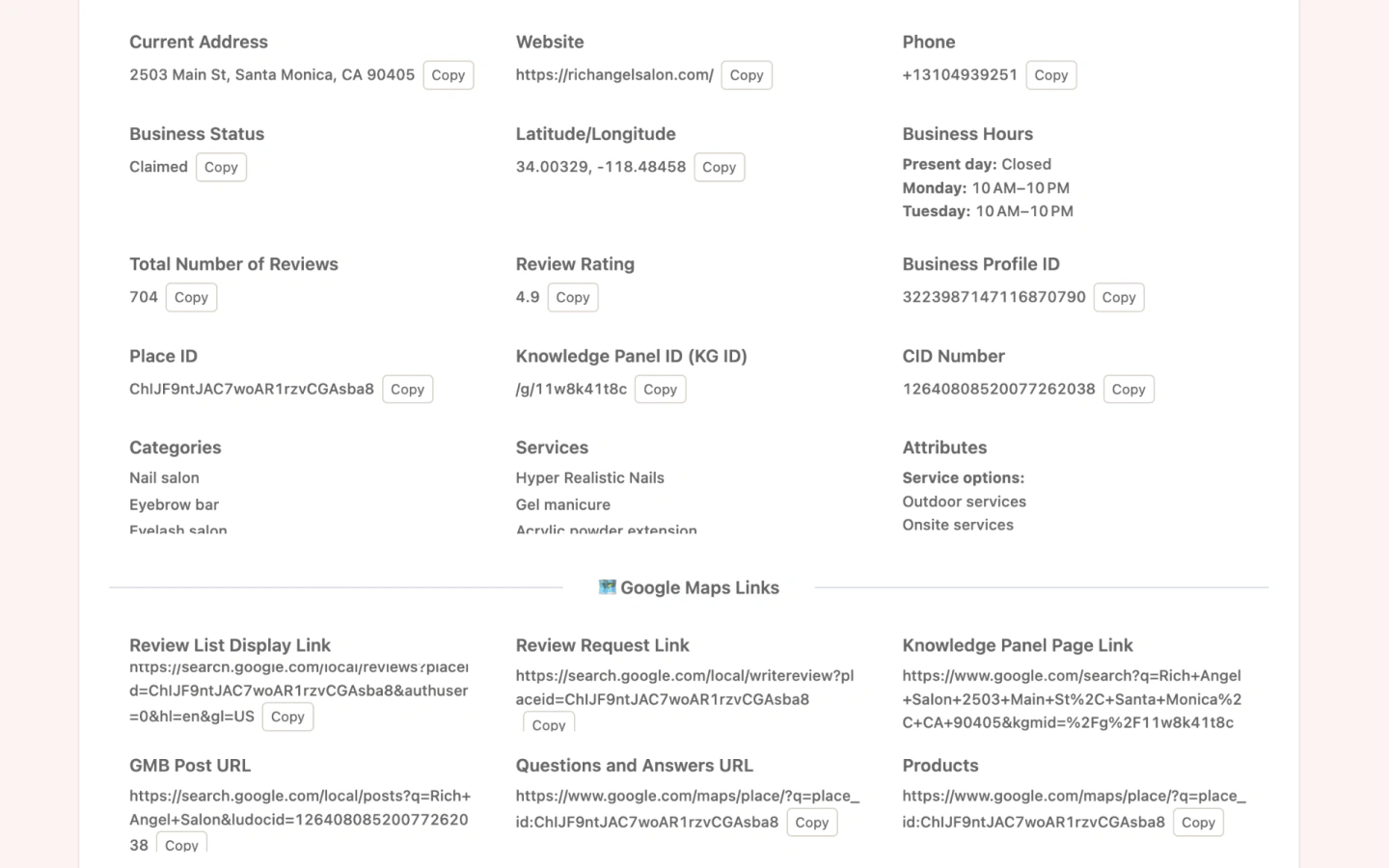
Export NAP, Place ID, CID, categories, hours, and attributes—plus Maps and third-party audit links—in one report.
Learn about Basic AuditWebsite Audit
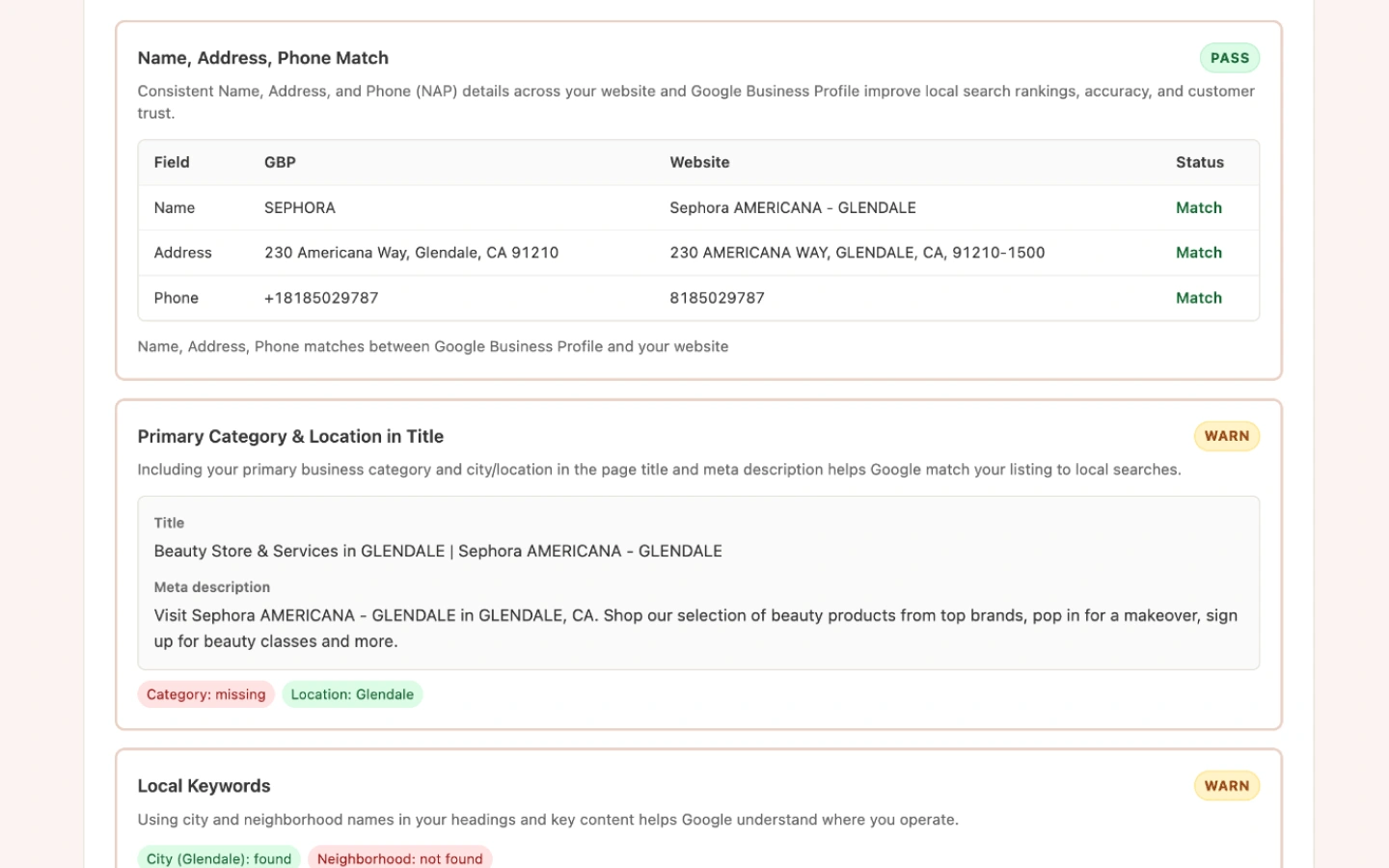
Compare the business website to the Google Business Profile: NAP match, meta tags, hours, category pages, content depth, and more.
Learn about Website AuditReview Audit
Auto-scroll and collect up to 800 Google reviews with rating distribution, Local Guide share, and a full review list.
Learn about Review AuditPost Audit
Measure posting frequency, average length, image/link/video usage, and a posts-over-time chart for up to 50 posts.
Learn about Post AuditLocal Scan
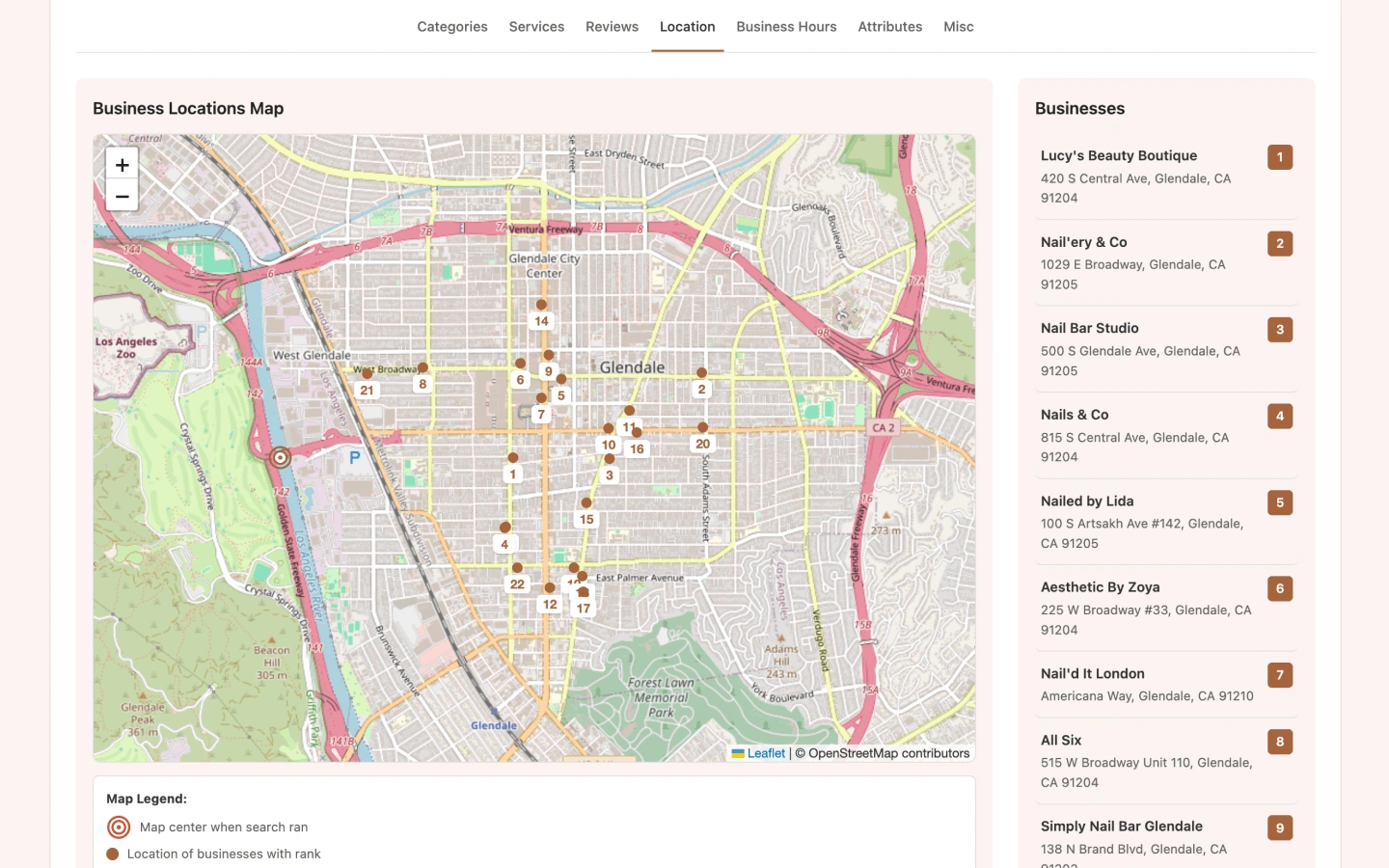
Scan up to 22 local results and compare categories, services, reviews, location, hours, attributes, and misc profile features by rank.
Learn about Local ScanGoogle Maps review scraper
Batch-scrape Google Maps reviews without endless scrolling
Review Audit auto-scrolls a listing’s reviews (up to 800), then builds star distribution, Local Guide share, and a full list you can use in client reputation reports.
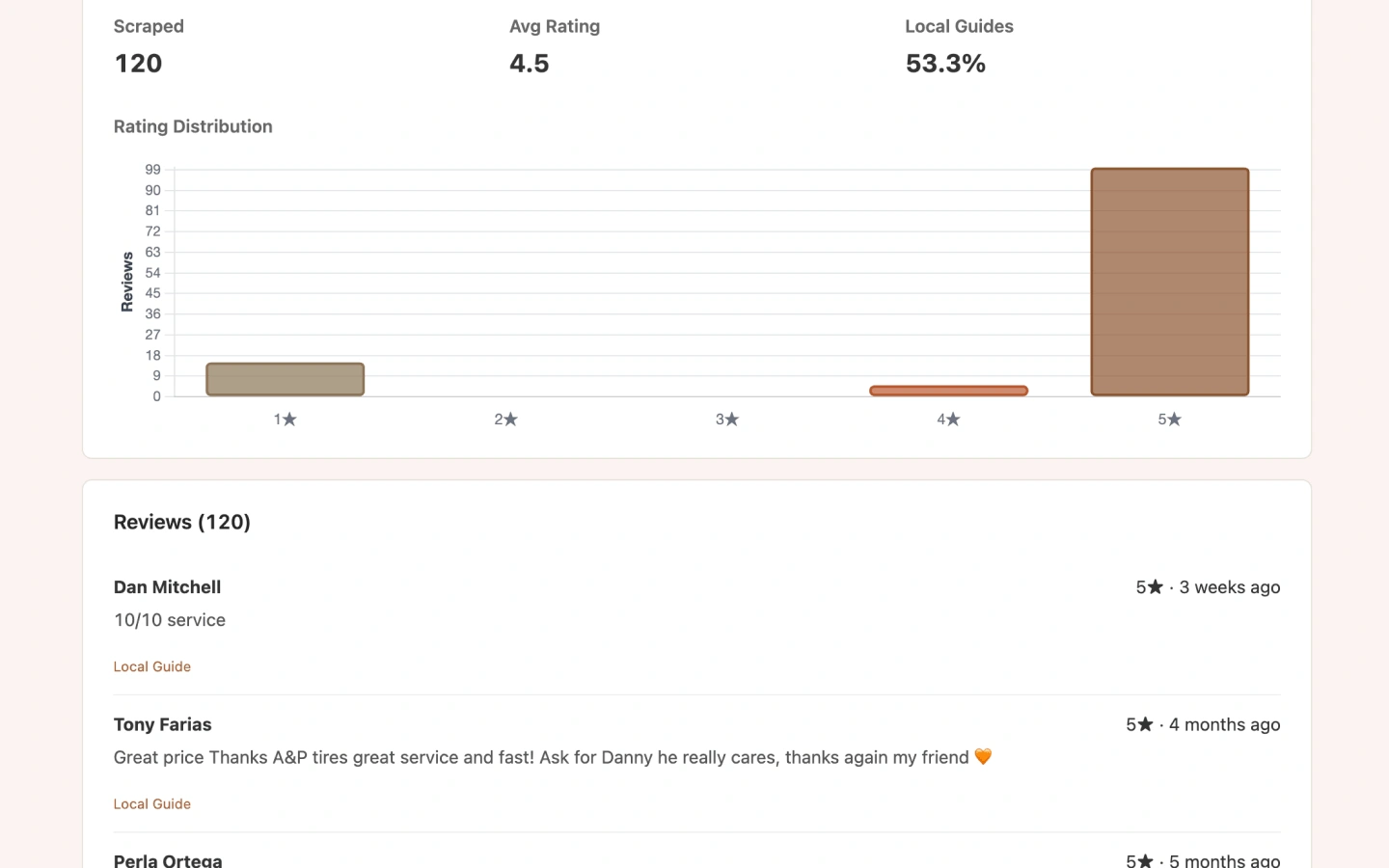
Report previews
Dashboard reports open inside the extension after each audit—profile exports, website checks, and competitor scans.
How it works
From install to a saved GBP report in four steps.
Install the extension
Add GMB Audit Tool and follow the guided Chrome install when the store link is unavailable.
Open Maps, Search, or Local Finder
Search a local keyword or open a Google Business Profile listing.
Click an audit button
Run Basic, Website, Review, Post, or Local Scan—then open the dashboard report.
Save and revisit reports
Reports stay in the extension so you can reopen audits during the client engagement.
Who it's for
Same extension, different jobs—pick the audits that match your delivery model.
Local SEO agencies
Speed up onboarding with Basic Audit link packs, pitch Local Scan competitor matrices, and deliver Website Audit fix lists.
Business owners & marketers
Check whether your site matches Google, see who ranks nearby, and understand review and posting gaps.
SEO freelancers
Quantify reviews and posts for retainers without endless scrolling—then package findings for clients.
Free vs Pro at a glance
Free: 5 report views/day. Pro: unlimited reports across all five audit types.
Free GBP tools
Place ID, categories, review links, and more—no install required. Use them alone, or let the extension pull the same data from Maps.
Google Place ID Finder
Paste a Google Maps URL and extract the Place ID for review links and APIs.
GBP Category Search
Search 4,000+ Google Business Profile categories by name or GCID.
Category Finder
Multi-select GBP categories, copy the list, or open with ?categories= prefilled.
Related Categories
Select a GBP category and get related suggestions for additional categories on your listing.
Maps ID Extractor
Paste a Google Maps or Search URL and pull Place ID, CID, and KG ID.
CID Converter
Convert CID between decimal and hex, plus quick Maps and Posts links.
Simple pricing for GBP audits
Start free with five report views per day across Basic, Website, Review, Post, and Local Scan. Upgrade to Pro for unlimited reports. Cancel anytime.
Free
Run all five audit types on Google Maps, Search, and Local Finder with a daily report limit.
- Basic, Website, Review, Post, and Local Scan
- Works on Maps, Search Local Pack, and Local Finder
- Saved reports in the extension dashboard
- Up to 5 report views per day
- Unlimited reports are not included
Pro
For agencies and freelancers who audit many Google Business Profiles each week.
- Everything in Free
- Unlimited report views
- All five audit types without daily caps
- Priority support from the ExtensionsFox team
- Updates included while subscribed
Frequently asked questions
Which Google surfaces are supported?
GMB Audit Tool injects on Google Maps, Google Search Local Pack, and Local Finder. Open a listing or search results page, then run Basic, Website, Review, Post, or Local Scan.
What is included in Free vs Pro?
Free includes all five audit types with up to 5 report views per day. Pro unlocks unlimited report views, priority support, and updates while subscribed.
Do you offer free GBP tools without installing?
Yes. Browse all free tools at /tools—Place ID Finder, review QR posters, UULE and local schema generators, rating calculators, JSON helpers, reply templates, and a GBP checklist. No signup required. The Chrome extension still pulls Place ID, CID, categories, and full audits from Maps in one click.
Is GMB Audit Tool affiliated with Google?
No. GMB Audit Tool is published by ExtensionsFox and is not endorsed by, affiliated with, or sponsored by Google. Google, Google Maps, and Google Business Profile are trademarks of their respective owners.
Do you upload Google Business Profile data to your servers?
Audits run in your browser against Google pages you open. Reports are stored locally in the extension. Account and billing data for Pro are handled by ExtensionsFox—see our Privacy Policy.
What are the scrape limits?
Review Audit collects up to 800 reviews, Post Audit up to 50 posts, and Local Scan up to 22 businesses per run.
Who can I contact for help?
Email help@extensionsfox.com for installation, billing, or troubleshooting.
Start auditing Google Business Profiles today
Install GMB Audit Tool free—5 report views per day—and run Basic, Website, Review, Post, and Local Scan from Google Maps and Search.
Get GMB Audit Tool